For digital nomads, retirees in remote areas, and anyone in Guatemala without reliable fiber internet, Starlink has become a transformative option. Coverage spans the entire country including Lake Atitlán’s boat-only towns, Petén jungle, and Pacific coastal areas. Pricing is competitive with high-tier Guatemalan cable internet but vastly more reliable in remote locations. This page covers current Guatemala pricing, what to expect, alternatives, and the setup process.
Current Starlink Guatemala pricing (2026)
Approximate pricing in USD:
| Plan | Monthly cost | Hardware | Use case |
|---|---|---|---|
| Standard Residential | $50-$80 | $400-$500 | Stationary home use |
| Mobile/Portable (RV) | $80-$120 | $500-$600 | Travel between locations |
| Business | $150-$250 | $500-$700 | Business priority service |
| Roam (basic mobile) | $50/month | $500 | Pause/resume flexibility |
Pricing is set in USD. Payment can come from:
- US credit card
- US debit card
- Guatemalan bank-issued international Visa/Mastercard
Local Guatemalan currency payments are typically converted from USD at the time of billing.
What to expect performance-wise
In real-world Guatemalan conditions:
| Metric | Typical | Notes |
|---|---|---|
| Download speed | 100-300 Mbps | Faster than most non-premium Guatemalan cable |
| Upload speed | 10-30 Mbps | Better than most cable; suitable for video calls |
| Latency (ping) | 30-50ms | Lower than typical Latin American satellite; suitable for gaming |
| Reliability | 95-99% uptime | Brief micro-outages during heavy storms or solar events |
Speeds vary by:
- Time of day (peak hours 7-10 PM can be slower)
- Local cell density (more users = more congestion)
- Weather (heavy rain can briefly affect signal)
- Tree coverage at install location
For most digital nomad and retiree use cases — Zoom calls, streaming, browsing, work-from-home — Starlink performance is more than adequate.
Tip for streaming and US banking: Starlink in Guatemala can geo-locate you anywhere in Latin America depending on the cell, which sometimes confuses US streaming services and banking sites. A VPN like NordVPN routes through US servers, fixes geo-blocks, and protects your sessions on cafe / coworking WiFi when you’re not on Starlink.
Coverage in Guatemala
Starlink works essentially anywhere in Guatemala with clear sky view:
Confirmed strong coverage
- Antigua Guatemala: Excellent
- Lake Atitlán (all towns including Jaibalito, Santa Cruz): Excellent — eliminated the “boat-access internet problem”
- Guatemala City and suburbs: Available, but cable fiber is usually equivalent or better
- Quetzaltenango: Excellent
- Cobán: Good
- Petén (Tikal area, Flores): Good — major reliability improvement over previous options
- Pacific coast (Monterrico, Iztapa): Good
- Atlantic coast (Río Dulce, Livingston): Good
- Remote municipalities: Generally workable wherever sky view is clear
Issues by location
- Dense jungle canopy: Some Petén jungle locations need clearance/positioning
- Heavy mountain shadow: Some narrow valleys can have limited sky window
- Old town centers with high walls: Antigua Centro courtyards can have sky issues — install on rooftop
In practice, Starlink installation flexibility solves most coverage edge cases. The dish needs an unobstructed cone of sky (~110° wide centered overhead), which is achievable in nearly all Guatemalan locations.
Hardware setup
What’s in the kit
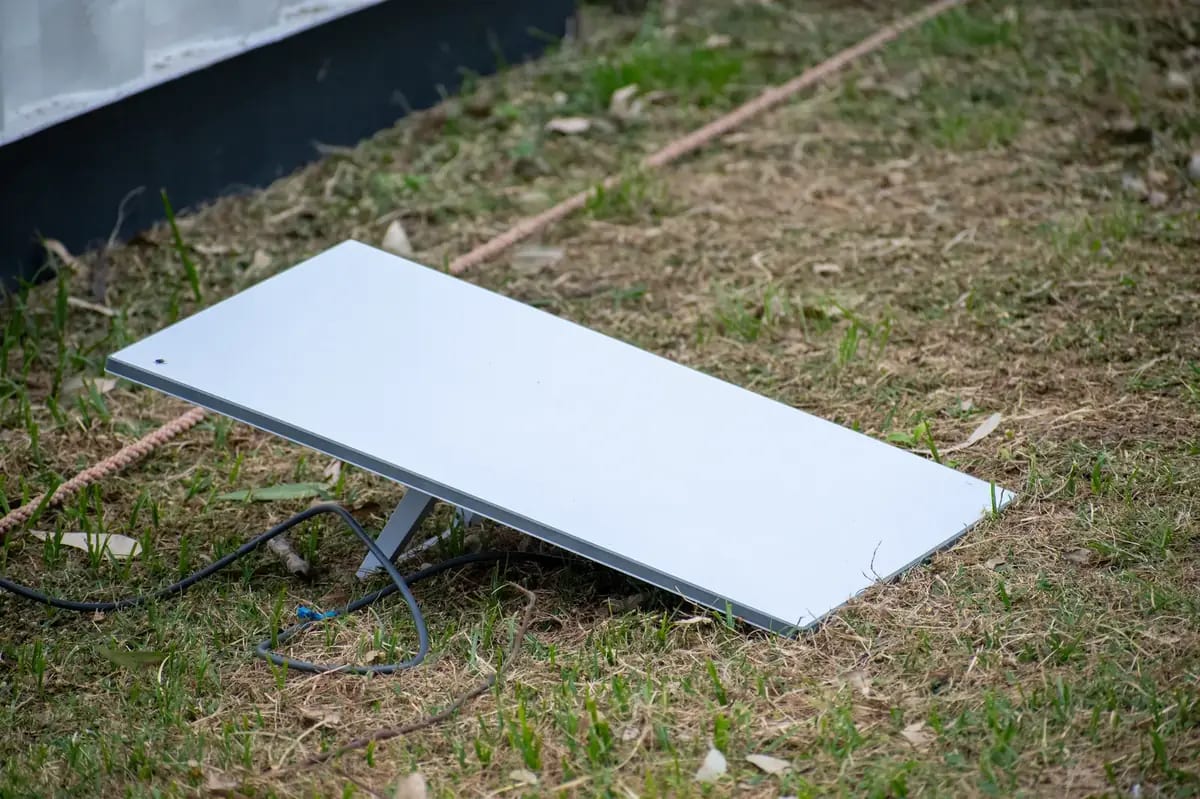
- Starlink dish (the receiver)
- Mounting base (for outdoor placement)
- Power supply
- Cable (typically 23m / 75 ft)
- Wi-Fi router (built into newer kits)
Installation
Self-install is straightforward:
- Choose a location with clear sky view (use the Starlink app for site survey)
- Install dish (rooftop, mast, or weighted base)
- Run cable to router location indoors
- Plug in power
- Activate via Starlink app
Total install time: 30-60 minutes for self-install. Some users hire local handymen for complex rooftop installations ($30-$80).
Customs clearance
When Starlink hardware ships to Guatemala, it goes through SAT customs:
- Standard residential kits typically clear in 1-3 days
- Cost: usually no additional duties charged for personal-use Starlink kits (treated as residential telecommunications equipment)
- Tracking provided through Starlink shipping partner
If customs holds the package, you may need to provide:
- Proof of personal use (not commercial)
- Address verification
- ID
Alternatives to Starlink
For comparison, Guatemala’s other internet options:
Tigo (cable/fiber)
- Major Guatemalan ISP
- Fiber service in Guatemala City and major towns
- Plans: $30-$150/month for 30-1000 Mbps
- Pros: Cheaper than Starlink in fiber-served areas; established support
- Cons: Limited rural coverage; quality varies; outages during severe weather
Claro (cable/fiber)
- Major Guatemalan ISP
- Similar coverage and pricing to Tigo
- Solid in urban areas
Other ISPs (mobile data, regional providers)
- Mobile data (Tigo, Claro): Backup option, can hit speed/data caps
- Regional ISPs: Limited coverage, variable quality
When Starlink is the right choice
- Living in rural areas (Lake Atitlán beyond fiber zones, rural municipalities, jungle)
- Need backup for primary internet (high-availability use cases)
- Frequent travel within Guatemala (Mobile plan)
- Working from boat-access communities
- Need reliable upload speeds (often higher than Guatemalan cable)
When cable/fiber is better
- Living in Guatemala City fiber zones (cheaper, often equivalent)
- Tight monthly budget (cable can be $30/month vs. Starlink $50-$80)
- Need 1+ Gbps for high-bandwidth use cases
- Don’t have outdoor mounting access
For digital nomads
Starlink Mobile/Portable is particularly attractive for digital nomads moving between Guatemala locations:
- $50-$120/month with pause/resume flexibility
- Take the dish from Antigua to Lake Atitlán for a month
- Work reliably from any spot with sky view
- No need to set up local cable accounts at each location
This is a major lifestyle improvement over previous nomad reality (mobile hotspots, hotel Wi-Fi, paid coworking spaces).
Practical considerations
Power resilience
Starlink dish + router need power. In areas with frequent outages:
- UPS (uninterruptible power supply) keeps the equipment running through brief outages
- Solar + battery backup for serious continuity
- Power consumption: dish ~50W, router ~15W = manageable for backup systems
Storms
Heavy storms can briefly affect signal — typically 5-30 second drops during peak rain. Generally not service-disabling, just inconvenient.
Mounting
Install requirements:
- Clear sky view (no major obstructions in 110° cone)
- Stable mount that won’t shift in wind
- Cable run to indoor router location
For rental properties, ensure landlord agrees to dish installation (most do for residential units).
Lifecycle
Starlink hardware is solid-state, no moving parts in dish (newer Gen 3). Expected lifespan: 5+ years. Software updates are automatic.
What’s next
For digital nomads in Guatemala:
- Internet Speed by Region — comparison of all internet options
- Coworking in Antigua — coworking spaces if you prefer office environments
- Best Neighborhoods for Retirement — many neighborhoods now Starlink-served
For real estate decisions affected by internet availability:
- Real estate buying guides — Starlink eliminates many “no internet” property risks
Frequently Asked Questions
How much does Starlink cost in Guatemala?
Residential service runs approximately $50-$100/month depending on plan. Hardware (kit) costs $400-$600 one-time. Mobile/RV plans are slightly higher. Business and maritime plans run higher. Pricing is in USD; payment from Guatemalan bank account or US card.
Does Starlink work everywhere in Guatemala?
Yes for most populated areas. Coverage includes all major cities, Lake Atitlán towns (including boat-only Jaibalito and Santa Cruz), Petén/Tikal jungle area, Pacific coast, and most rural locations. Dense forest canopy can affect signal — clear sky view is required.
How fast is Starlink in Guatemala?
Typical speeds: 100-300 Mbps download, 10-30 Mbps upload. Latency around 30-50ms — sufficient for video calls, streaming, gaming. Speeds can vary by time of day and local congestion. Generally faster than most Guatemalan cable internet outside Guatemala City premium zones.
How long does it take to get Starlink in Guatemala?
Typical timeline: order online, kit shipped within 1-2 weeks via DHL or local courier, self-install in 30-60 minutes, online within hours. No technician visit required. The biggest delay can be customs clearance for the hardware (1-7 days).
Is Starlink legal in Guatemala?
Yes. Starlink received regulatory approval from SIT (Superintendencia de Telecomunicaciones) and operates legally as a residential and business internet service. Service has been active since 2023.
![Best Places for Remote Workers in Guatemala [2026 Ranked]](/cdn-cgi/image/width=640,format=auto,quality=80/images/photos/antigua-street-scene-2020.webp)