- 🆔 DPI (Guatemalans) or passport (foreigners) scanned both sides
- 📧 Active email for SAT confirmation and password setup
- 📱 Cell number for verification SMS
- 🏠 Fiscal address in Guatemala (or representative's if abroad)
- 📋 Economic activity you'll register (employment, freelance, business, etc.)
The NIT (Numero de Identificacion Tributaria) is Guatemala’s taxpayer identification number, issued by the SAT (Superintendencia de Administracion Tributaria). You need it for any economic activity in Guatemala — from opening a bank account to starting a business.
Quick summary: The NIT is free (Q0). Since March 2025, your DPI number (CUI) automatically works as your NIT if you’re a Guatemalan citizen. Foreigners must apply in person at SAT with a valid passport.
This page is for: foreigners getting their first NIT, business/entity NIT registration, and US-based diaspora handling NIT processes from abroad. If you’re a Guatemalan citizen looking up your existing CUI-NIT number, use the SAT CUINIT consulta page → (or in Spanish →).
What is the NIT? (and what “NIT” means in English)
The NIT (Numero de Identificacion Tributaria) is the mandatory registration with the Superintendencia de Administracion Tributaria (SAT) for any person carrying out economic activity in Guatemala. Translated, it is simply Guatemala’s tax identification number — the nearest US equivalents are the SSN or ITIN for an individual and the EIN for a company. Guatemalan forms, invoices and contracts always print the Spanish abbreviation NIT, so that is the term to use when filling anything out.
| Which number you will see | What it looks like | Still valid? |
|---|---|---|
| Historical NIT | 8-9 digits, issued by SAT before the 2025 unification | Yes — historical NITs still work, now linked to the CUI |
| Unified NIT (“CUINIT”) | The 13 digits of your DPI, format XXXX XXXXX XXXX | Yes — the default for Guatemalan citizens since March 2025 |
| Company NIT | Its own number, separate from the legal representative’s | Yes — a company always has its own |
The NIT is permanent: it never expires, it never renews, and the number does not change if you lose or replace your DPI. For the full side-by-side of the three numbers people confuse, see NIT vs CUI vs DPI explained.
Do you even need to apply? Start here
Most people who land on this page already have their number and do not know it. Find your row before you fill in anything:
| Who you are | Do you need to register a NIT? | What to do |
|---|---|---|
| Guatemalan citizen with a valid DPI | No — there is no procedure left to do | Verify the unification at the SAT CUI-NIT lookup and save a screenshot of the result. That screenshot is what you show employers, banks or clients who ask for a “constancia de NIT” |
| Guatemalan citizen without a DPI | Yes, but indirectly | Get the DPI first. No DPI means no CUI, and no CUI means no automatic unification |
| Foreigner — resident, or visitor with economic activity | Yes — the CUI-NIT unification does not apply to foreigners | Online form, then in person at a SAT office within 10 business days with your original passport |
| Company, NGO or association | Yes — its NIT is distinct from the legal representative’s | In-person visit with the incorporation deed and patente de comercio |
| A minor (inheritance beneficiary, bank account) | Yes, when one is genuinely needed | A parent or legal guardian files it, presenting their own DPI and a document proving legal representation. See minor ID document |
Cost
Free (Q0) — There is no official fee. SAT charges nothing for the registration, nothing for the CUI-NIT lookup, and nothing for issuing the constancia. If someone charges you to “process” it, that is a gestor charging for their time — the procedure itself has no cost.
How long it takes
| Situation | Time |
|---|---|
| Guatemalan with a valid DPI | Immediate — the CUI already is the NIT; nothing to file |
| Online form | About 30 minutes to complete |
| Foreigner / company — effective activation | The same day as the in-person SAT visit, which must fall within 10 business days of submitting the form |
| Printed constancia | Handed to you at the counter on the spot |
What Changed in 2025
Through Resolution SAT-DSI-393-2025, the CUI (your DPI number) was unified with the NIT for individual Guatemalan citizens. Your 13-digit DPI number is now your NIT — no separate registration needed.
You can verify the unification at: portal.sat.gob.gt/portal/consulta-cui-nit/
Requirements
Guatemalan Citizens
- Valid DPI (original)
- Digitized DPI (both sides in a single PDF or image file)
- Your economic activity classification
- Utility bill — water, electricity, or phone (no older than 3 months)
Foreigners
- Valid passport (original and photocopy) — or residency document if applicable
- Utility bill from your fiscal address (original and copy)
- Lease agreement or document proving right to use the property
Businesses (Legal Entities)
- Legal representative’s DPI
- Utility bill (3-month validity)
- Appointment deed of legal representative
- Articles of incorporation (see our guide to registering a business)
- Business license (patente de comercio)
Why NIT applications get rejected
Every rejection below is avoidable before you submit — none of them needs a second trip if you check first:
| Reason for rejection | How to avoid or fix it |
|---|---|
| DPI illegible in the scan | Re-scan at 300 DPI minimum, in good light, without glare |
| Name does not match the DPI exactly | Copy the name exactly as printed — accents, capitalisation and order all count |
| Utility bill more than 3 months old | Download a fresh one from your provider’s portal (EEGSA, EMPAGUA, Energuate, Tigo, Claro) |
| Fiscal address cannot be evidenced | Use a signed lease agreement or the property title |
| Passport expired — or expiring | Renew it first. SAT does not accept expired passports, nor ones with less than 6 months left |
| Economic activity typed as free text | Pick it from the official SAT catalogue dropdown, not a text field |
| You did not appear within 10 business days | The form is cancelled automatically — you must start over from scratch |
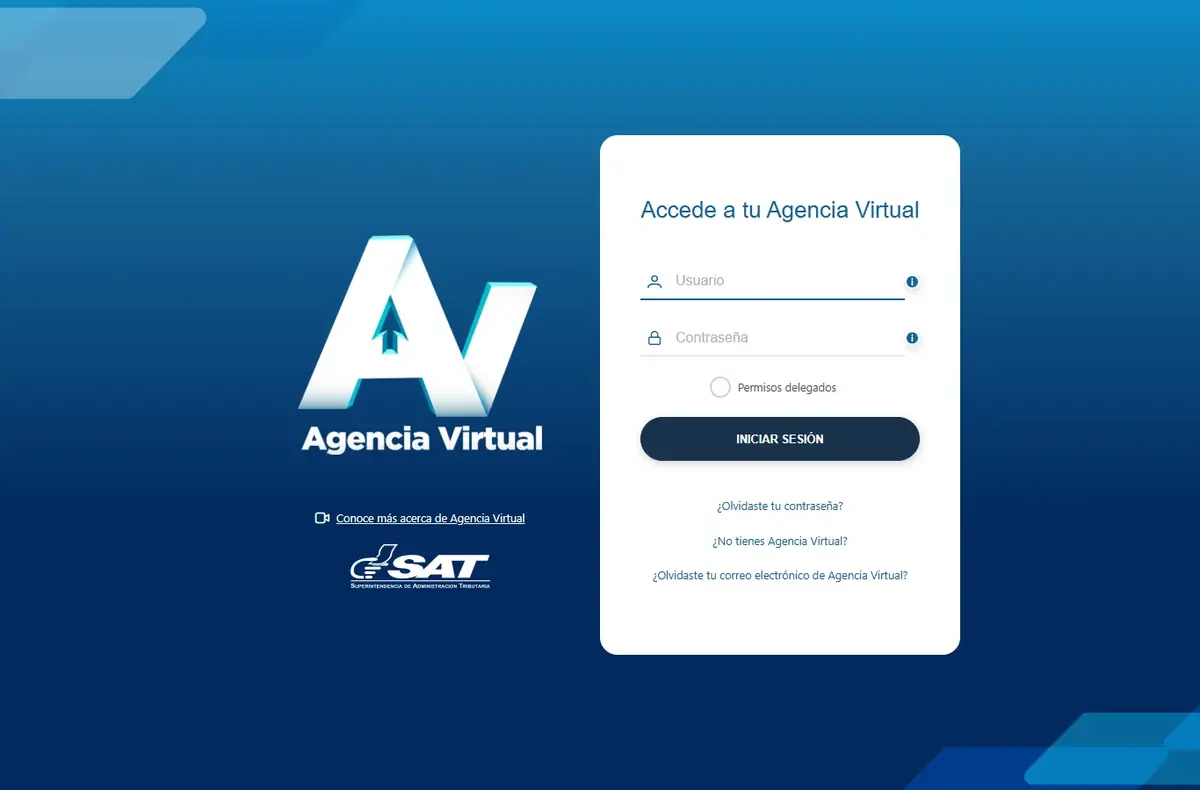
SAT Agencia Virtual login (agenciavirtual.sat.gob.gt). Your NIT is the username. If you have not registered, use ‘¿No tienes Agencia Virtual?’ to start.
Step-by-Step Process
- Go to the SAT portal: portal.sat.gob.gt/portal/solicitud-electronica-de-nit/
- Fill out the electronic form with your personal data (names must match your DPI exactly)
- Upload your digitized DPI (both sides, single file)
- Select your economic activity
- Receive your form number by email
- Visit any SAT office within 10 business days with your original documents
- Receive your NIT certificate
Details
If you run a foreign company that sells into Guatemala but has no physical office, you may still need a NIT for customs, tax withholding, or contract purposes. In this case, you must appoint a legal representative in Guatemala who applies for the NIT on behalf of the foreign entity. This requires: a power of attorney from the foreign company (apostilled), articles of incorporation of the foreign entity (translated and apostilled), and the legal representative’s DPI. The process is more complex than a standard NIT and may require legal assistance from a Guatemalan attorney.
Details
If your DPI is expired or in the process of being renewed at RENAP, SAT may refuse to process your NIT registration because they require a valid (non-expired) DPI. You cannot use a temporary RENAP receipt in place of a valid DPI for NIT purposes. Solution: renew your DPI first, wait for the new card, then proceed with the NIT process. If you already have a NIT and your DPI expires, your NIT remains valid — you just cannot make changes to your RTU until you present a current DPI.
Details
If there is a discrepancy between your DPI name and your NIT records (common after name changes due to marriage, or after DPI renewals that corrected spelling), you must visit a SAT office in person to update your NIT records. Bring your current DPI (with the correct name) and any supporting legal documents (marriage certificate, court order for name correction). SAT will update the NIT record to match the DPI. Do not attempt to file declarations or request a solvencia fiscal until the name mismatch is resolved — SAT’s system may flag inconsistencies.
NIT status: “registered” is not the same as “active”
A NIT that exists in SAT’s records is not automatically a NIT you can operate with. This is the distinction that catches people out at a bank counter:
| Status | What you can actually do with it |
|---|---|
| Active | Up to date on filings — can issue electronic invoices, receive formal payments, operate bank accounts |
| Registered but inactive | On file, no recent activity. Some banks reject it |
| Suspended | Triggered by consecutive missed filings — blocks invoicing until you regularise |
| Cancelled | Permanent closure: death, company wind-up, or your own request |
If you stop filing for several consecutive periods, SAT can suspend your NIT automatically. To reactivate it: bring the missed declarations up to date in Agencia Virtual — even the zero-value ones — pay any fines that apply, and request reactivation from Agencia Virtual or at a SAT office. Complex cases require an in-person visit with your DPI.
After you get the NIT — what actually makes it usable
Having the number is not enough to operate. These are the next steps:
- Create your SAT Agencia Virtual account — register at agenciavirtual.sat.gob.gt with your NIT and email. This is the portal where you declare and pay. See Agencia Virtual.
- Generate a password and validate your email — SAT sends an activation code by email.
- Set up Declaraguate — the official tool for monthly and annual filings (ISR, and IVA where it applies).
- Choose your tax regime — pequeño contribuyente, régimen general, or profesional liberal. This decides how much you pay; see pequeño contribuyente and changing tax regime.
- File the first declaration — even with zero income, you must file a zero-value declaration for the first period. Not doing so triggers automatic fines.
With an active NIT you can calculate your net salary, work out your IGSS contribution, and prepare your annual ISR return.
Your fiscal address (domicilio fiscal) — what it is and how to change it
Your domicilio fiscal is the address SAT holds on record for you, and it is the address SAT sends notifications to. That is why the application asks for a utility bill and a lease agreement rather than an address typed into a box.
- What proves it: a water, electricity or landline bill in your name, no more than 3 months old. If the bill is not in your name — the usual case for renters — bring the signed lease agreement or a notarised letter from the property owner. Digital PDF bills are accepted.
- Foreigners: the utility bill must be for the fiscal address you are declaring, and it is presented alongside the lease agreement or an equivalent document proving your right to use the property.
- If you move: update the fiscal address in Agencia Virtual. SAT sends notifications to the address on record, so an out-of-date one means you do not hear about a filing problem until it has already become a fine.
From the US (Diaspora Info)
If you’re a Guatemalan citizen living in the United States:
- Your DPI number already is your NIT since March 2025 — verify at portal.sat.gob.gt/portal/consulta-cui-nit/
- If you need to register a new NIT (for a business, etc.), you must do it in person in Guatemala
- Power of attorney option: You can authorize someone in Guatemala through a poder especial notarized at a Guatemalan consulate to handle the process on your behalf
- Nearest consulates: minex.gob.gt/consulados — offices in Los Angeles, New York, Houston, Chicago, Washington DC, and other US cities
- Call the SAT information line: 1550 for questions
Tips
- New: See our dedicated CUI vs NIT guide for detailed lookup instructions
- For Guatemalans with a valid DPI, the CUI already works as your NIT since March 2025
- Names must match exactly with your DPI — any discrepancy will delay the process
- If you don’t show up within 10 business days, you must file a new application
- Foreigners must appear in person with their original passport
- You can visit any SAT tax office nationwide
Related SAT Tramites
- RTU Registration — register your tax profile after getting your NIT
- FEL Electronic Invoicing — enable invoicing with your NIT
- Pequeno Contribuyente — simplified regime linked to your NIT
- Monthly IVA Declaration — tax filing tied to your NIT
- Tax Clearance (Solvencia Fiscal) — proves your NIT is in good standing
- New Vehicle Registration — requires a NIT
Common Errors and Solutions
If the SAT portal does not work as expected during NIT registration, these are the most common issues and how to resolve them:
The “I am human” captcha will not load or pass
The SAT portal uses hCaptcha (not Google reCAPTCHA). Ad blockers like uBlock Origin, AdGuard, and Brave Shields commonly block it. Fix: disable your ad blocker for portal.sat.gob.gt only, or use a different browser. Incognito/private mode also bypasses most blockers.
“Your data does not match our records”
This usually means your name on the form does not exactly match your DPI or passport — accents, capitalization, or first/last name order are off. Fix: copy the name exactly as printed on the DPI (with accents if present, without if not), in the same order. For foreigners: match the passport’s machine-readable zone (MRZ) name field rather than the human-readable name above the photo if they differ.
Your DPI scan or passport scan is rejected
SAT accepts PDF or JPG/PNG up to about 4MB per file. Both sides of the DPI must be in ONE file. Fix: scan at 300 DPI in good light without glare. If the file is too large, compress it at ilovepdf.com or smallpdf.com. For foreigners: scan the passport photo page AND the page with the valid Guatemala entry stamp (immigration officers sometimes ask for it).
Utility bill rejected as “expired”
SAT accepts water, electricity, or landline phone bills with a maximum age of 3 months. If yours is older, download a fresh one from your provider’s portal (EEGSA, EMPAGUA, Energuate, Tigo, Claro). If the bill is not in your name (renters), bring the signed lease agreement OR a notarized letter from the property owner. Digital PDF bills are accepted.
You missed the 10-business-day window for the in-person visit
If you do not appear at a SAT office within 10 business days of submitting the online form, the application is automatically canceled. There is no recovery or extension — file a new application from scratch. To avoid this, only submit the online form when you know you can visit a SAT office within the window.
Verification email never arrives
SAT sends verification codes to the email on your form. If it does not arrive: (1) check spam/junk folders, (2) confirm the email was typed correctly on the form, (3) for Gmail, whitelist notificaciones@sat.gob.gt. If still nothing after 24 hours, the email field had a typo — you will need to re-submit the form.
The portal returns “El sistema no esta disponible” or a blank page
SAT runs scheduled maintenance most Sundays from 12am-6am Guatemala time. Servers also saturate on IVA deadline (day 14-15) and the annual ISR deadline (March 31). Try off-peak hours (4-7 AM or 10 PM-12 AM Guatemala time). If it persists for more than an hour during business hours, call 1550.
From the US: the SAT page rate-limits or times out
The SAT site is occasionally rate-limited from non-Guatemala IP ranges. Fix: try at off-peak hours (4-7 AM or 10 PM Guatemala time, which is mid-day or late night for most US time zones), or ask a family member in Guatemala to start the form for you.
Common Questions
What is a NIT in Guatemala?
The NIT (Numero de Identificacion Tributaria) is Guatemala’s taxpayer identification number, issued by SAT. It is mandatory for anyone with economic activity in the country — employment, invoicing, a bank account, a vehicle, a property transfer. It is free, permanent, and never renews.
What is NIT in English?
NIT stands for Numero de Identificacion Tributaria, which in English is simply the tax identification number. The nearest US equivalents are the SSN or ITIN for an individual and the EIN for a company. Guatemalan documents and invoices always use the Spanish abbreviation NIT, so use that when filling out forms.
How long does it take to get a NIT?
For a Guatemalan with a valid DPI, immediately — the CUI has been the NIT since March 2025 and there is nothing to file. For a foreigner or a company, the online form takes about 30 minutes and the NIT becomes effective the same day as the in-person SAT visit, which must happen within 10 business days of submitting the form. The printed constancia is handed to you at the counter.
Can I get the NIT online?
Partly. The initial form is 100% online at the SAT portal, but foreigners and legal entities must finish the process with an in-person visit to a SAT office within 10 business days. Guatemalan citizens with a valid DPI need no procedure at all — their CUI already works as the NIT.
Do I need a NIT if I am an employee?
Yes. Anyone in a formal employment relationship in Guatemala needs a NIT — your employer requires it to add you to payroll, withhold ISR, and report you to IGSS. If you are Guatemalan, your CUI already fills this role. If you are a foreign hire, register your NIT before the first payment.
What do I do if my NIT is suspended?
A NIT moves to suspended or inactive status after several consecutive periods without filings. To reactivate it: log into SAT Agencia Virtual, bring the missed declarations up to date (even zero-value ones), pay any fines that apply, and request reactivation. Complex cases require an in-person visit to a SAT office with your DPI.
Is the NIT the same as the DPI number now?
Yes. Since March 2025, Guatemala’s SAT unified the CUI (DPI number) with the NIT for individual Guatemalan citizens. Your 13-digit DPI number now works as your NIT automatically.
Can I get a NIT if I’m a foreigner?
Yes. Foreigners can get a NIT by applying in person at any SAT office with a valid passport, proof of address, and a lease agreement. You must complete the online form first and visit within 10 business days.
Do I need a NIT to open a bank account in Guatemala?
Yes. Banks require a NIT for account opening. For Guatemalan citizens, your DPI number now serves as your NIT automatically.
Can I get a NIT from the United States?
No. The NIT must be processed in person at a SAT office in Guatemala. If you’re abroad, you can authorize someone through a notarized power of attorney (poder especial) to handle the process.
Do I need a separate NIT if I already have a DPI?
For Guatemalan citizens, no — your CUI (DPI number) is automatically your NIT since the 2025 unification. However, if you want to start a business (persona juridica), the business entity needs its own separate NIT distinct from your personal one.